
Install docker compose using YUM in Photon OS
Install python-pip
$ yum install -y python-pipThen install Docker Compose:
$ pip install docker-compose
To verify a successful Docker Compose installation, run:
$ docker-compose version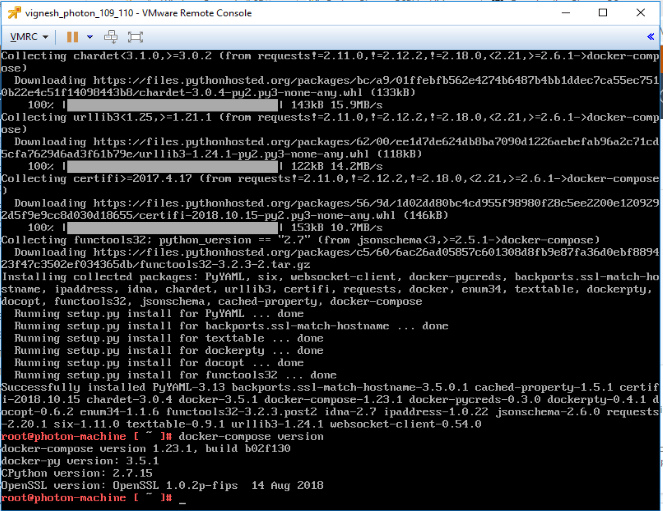
Install python-pip
$ yum install -y python-pipThen install Docker Compose:
$ pip install docker-compose
To verify a successful Docker Compose installation, run:
$ docker-compose versionIn the last post i explained about taking the MySQL backup using php code , This post explains to take the backup of your MySQL database using the passthru function ( passthru documentation ) The passthru() function is similar to the exec() function in that it executes a command. This function should be used in…
This tutorial presumes that you understand what is a LAMP Server , how to deploy a web site and how to install software using Terminal and experience in running other Basic Terminal Commands. Root access To install any application you need root access , You can prefix sudo before every command or login to root…
VMware vCenter 5.1 and before the default behavior was to allow all domain admins to login and administrate your ESXi hosts. Once the 5.5 vCenter installed if you try and connect using a domain account you will get the error :The vSphere Client could not connect to “FQDN / IP”. You do not have permission…
Here is the some tips for the web admins and the web developers to speed up the image heavy website The Major drawback in the Image heavy websites is it takes more time to load , user lose their patience and just navigate away from your website Don’t use Flash Animation is unnecessary, but if…
Best practises in checking codeigniter sessions There are many practices in checking the session conditions for whether the user is logged in or not Usually we check in the codeigniter controllers function my_function() { $user = $this->session->userdata(‘user_id’); if (!isset($user)) { $logged_in = false; } else { $logged_in = true; } } This 4-8 lines of…

Day 2 activity of the DBA’s, after setting up the database server and configured all the required privileges and applying the patch, we will create a new database Developers and SysAdmins also should know to create database. Creating database from DBCA by using the GUI is very straight forward and simple. But if you don’t…
Subscribe now to keep reading and get access to the full archive.