
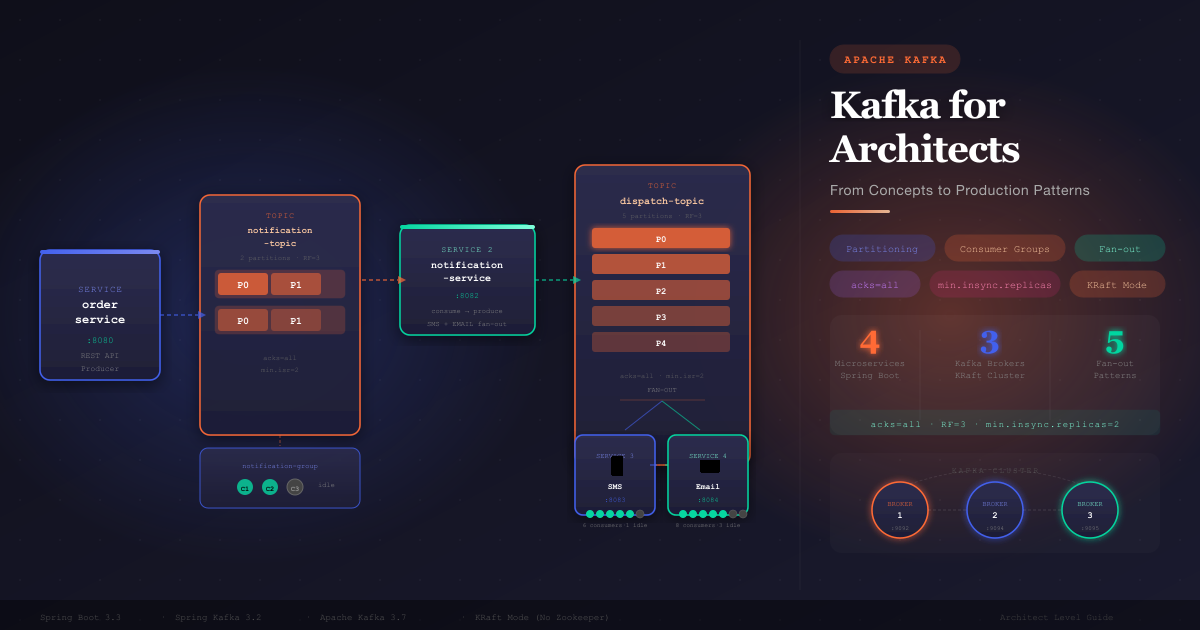
Apache Kafka for Architects: From Concepts to Production Patterns
A hands-on guide built around a real microservices system — order processing, notification fan-out, multi-broker clustering, and delivery guarantees.
1. Why Kafka? The Paradigm Shift
Traditional message queues (RabbitMQ, ActiveMQ, SQS) are built around a simple model:
Producer → [Queue] → Consumer → MESSAGE DELETED
Kafka rejects this model entirely. It is a distributed commit log, not a queue:
Producer → [Immutable Log] → Consumer A (offset 5)
                           → Consumer B (offset 2)
                           → Consumer C (offset 9)

Message lives until retention expires — not when consumed
The consequences of this design
| Traditional Queue | Kafka |
|---|---|
| Message deleted after consumption | Message retained (days, weeks, forever) |
| One consumer per message | Unlimited consumer groups, each reads every message |
| Scaling = more consumers | Scaling = more partitions |
| Replay is impossible | Replay by seeking to any offset |
| Ordered delivery hard | Ordered within a partition by design |
When Kafka wins:
- Fan-out to multiple independent consumers
- Event sourcing / audit log
- Stream processing pipelines
- Decoupling microservices at scale
- Replayable event history
When Kafka loses:
- Simple task queues (use SQS/RabbitMQ)
- Request-reply patterns (use gRPC)
- Low message volume with complex routing rules
2. Core Concepts Every Architect Must Know
Topic
A named, append-only log. Think of it as a database table that only supports INSERT and SELECT, never DELETE or UPDATE.
notification-topic
─────────────────────────────────────────────────
offset:  0        1        2        3        4
msg:  [evt-A]  [evt-B]  [evt-C]  [evt-D]  [evt-E]
                                           ← new messages append here
Partition
Topics are split into partitions for parallelism. Each partition is an independent ordered log.
notification-topic (2 partitions)

Partition 0: [evt-A] [evt-C] [evt-E]   ← orderId hash ends in even
Partition 1: [evt-B] [evt-D] [evt-F]   ← orderId hash ends in odd
Key insight: Ordering is guaranteed within a partition, not across partitions.
Key design rule: Use the entity ID (orderId, userId) as the message key → all events for the same entity land on the same partition → ordering preserved.
Consumer Group
A group of consumers that collectively consume a topic. Kafka assigns each partition to exactly one consumer in the group at a time.
notification-group (3 consumers, 2 partitions)

Partition 0 ──► Consumer 1  ✅ ACTIVE
Partition 1 ──► Consumer 2  ✅ ACTIVE
              Consumer 3    ⏸ IDLE  ← no partition to assign
Critical rule: Adding consumers beyond the partition count = idle consumers.
Offset
A sequential ID for each message within a partition. Each consumer group tracks its own offset independently.
dispatch-topic Partition 0
[msg0] [msg1] [msg2] [msg3] [msg4]
                      ↑              ↑
            notification-sms    notification-email
               offset=2            offset=4

notification-sms has 2 unread messages
notification-email has caught up
3. The Architecture I Built for PoC
Our system has four microservices connected by two Kafka topics:
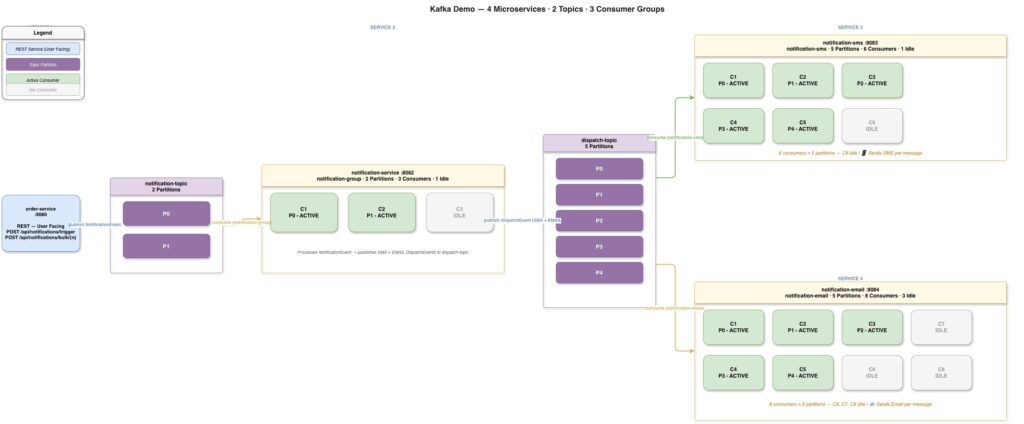
Why this design?
| Decision | Reason |
|---|---|
Separate notification-topic and dispatch-topic | notification-topic carries business events; dispatch-topic carries delivery instructions. Different concerns, different schemas, different retention needs. |
| notification-service as intermediary | Decouples order-service from knowing SMS/Email exist. Adding push notifications means zero changes to order-service. |
| orderId as message key | All events for an order go to the same partition → processing order preserved |
| 2 partitions on notification-topic | Low volume; 3 consumers gives idle demo |
| 5 partitions on dispatch-topic | Higher volume expected (SMS + EMAIL = 2x messages); more parallelism |
4. Deep Dive: Topics and Partitions
How partitioning works
// order-service: NotificationController.javakafkaTemplate.send(
    "notification-topic",
    order.getId(),      // ← KEY: Kafka hashes this to pick a partition
    notificationEvent
);
Kafka’s default partitioner:
partition = hash(key) % numPartitions

orderId = "abc-123" → hash = 847392 → 847392 % 2 = 0 → Partition 0
orderId = "def-456" → hash = 123847 → 123847 % 2 = 1 → Partition 1
No key provided? Kafka uses round-robin across partitions.
How many partitions?
Rule of thumb:
  partitions = max(target throughput / partition throughput)

  notification-topic: low volume (one per order) → 2 partitions
  dispatch-topic: 2x volume (SMS + EMAIL) → 5 partitions

  More partitions = more parallelism BUT
    - more open file handles on brokers
    - longer leader election on failure
    - more consumer threads needed to fully utilize
Replication factor
RF=3 means 3 copies of each partition across 3 brokers

Partition 0:
  Broker 1 → LEADER   (handles reads and writes)
  Broker 2 → FOLLOWER (replicates from leader)
  Broker 3 → FOLLOWER (replicates from leader)

If Broker 1 dies:
  Kafka elects Broker 2 or 3 as new leader
  Zero message loss (data was replicated)
  Zero downtime for consumers (within seconds of re-election)
5. Deep Dive: Consumer Groups and Idle Consumers
Partition assignment rules
Rule: Each partition is assigned to exactly ONE consumer per group
Rule: Consumers ≤ Partitions → all consumers are active
Rule: Consumers > Partitions → excess consumers are idle

notification-topic (2 partitions) + notification-group (3 consumers):

  Consumer 1 ──► Partition 0  ✅
  Consumer 2 ──► Partition 1  ✅
  Consumer 3 ──► (nothing)    ⏸

dispatch-topic (5 partitions) + notification-sms (6 consumers):

  Consumer 1 ──► Partition 0  ✅
  Consumer 2 ──► Partition 1  ✅
  Consumer 3 ──► Partition 2  ✅
  Consumer 4 ──► Partition 3  ✅
  Consumer 5 ──► Partition 4  ✅
  Consumer 6 ──► (nothing)    ⏸
Why have idle consumers?
Standby for instant failover. If Consumer 1 dies:
Before:
  Consumer 1 ──► P0 ✅   Consumer 2 ──► P1 ✅   Consumer 3 ──► idle

Consumer 1 crashes → Kafka triggers REBALANCE:
  Consumer 2 ──► P1 ✅   Consumer 3 ──► P0 ✅   (Consumer 1 gone)
Without an idle consumer, P0 would have zero consumers until a new one starts. With an idle consumer, failover is instant — the rebalance promotes the standby.
Rebalancing
When group membership changes (consumer joins/leaves/crashes), Kafka reassigns all partitions:
// Our consumers implement ConsumerSeekAware to log assignments@Override
public void onPartitionsAssigned(Map<TopicPartition, Long> assignments,
                                 ConsumerSeekCallback callback) {
    if (assignments.isEmpty()) {
        log.warn("[SMS] ⏸ IDLE | thread={}", Thread.currentThread().getName());
    } else {
        assignments.keySet().forEach(tp ->
            log.info("[SMS] 🎯 ASSIGNED | partition={}", tp.partition()));
    }
}
6. Deep Dive: Delivery Guarantees
The acks setting — producer side
Controls how many brokers must acknowledge before the producer considers the write successful.
acks=0  Fire and forget
        Producer ──write──► Broker 1
                 ◄────────  (no wait)
        Risk: silent data loss

acks=1  Leader acknowledgement
        Producer ──write──► Broker 1 (leader) ──► ACK
                                    └── replicates async ──► Broker 2, 3
        Risk: data loss if leader crashes before replication completes

acks=all  All in-sync replicas
        Producer ──write──► Broker 1 ──replicate──► Broker 2 ──► ACK
                                   └──replicate──► Broker 3 ──► ACK
                 ◄──────────────────────────────────────────────────
        Risk: none (survives any single broker failure)
min.insync.replicas — broker/topic side
The minimum number of ISRs a partition must have before accepting writes with acks=all.
# docker-compose-cluster.yml
KAFKA_MIN_INSYNC_REPLICAS: 2
dispatch-topic RF=3:
  ISRs = [Broker1, Broker2, Broker3]   # 3 ISRs
  min.insync.replicas = 2
  acks=all → needs 3 ACKs → 3 ≥ 2 ✅  → WRITE ACCEPTED

Broker 3 goes down:
  ISRs = [Broker1, Broker2]            # 2 ISRs
  min.insync.replicas = 2
  acks=all → needs 2 ACKs → 2 ≥ 2 ✅  → WRITE ACCEPTED (cluster still healthy)

Broker 2 also goes down:
  ISRs = [Broker1]                     # 1 ISR
  min.insync.replicas = 2
  acks=all → 1 < 2 ❌  → NOT_ENOUGH_REPLICAS (cluster protects data integrity)
ErrorHandlingDeserializer — consumer resilience
When a consumer encounters a message it can’t deserialize (wrong format, wrong class name), the default behavior crashes the container. Use ErrorHandlingDeserializer to skip bad records:
// notification-service: KafkaConsumerConfig.java
props.put(ConsumerConfig.VALUE_DESERIALIZER_CLASS_CONFIG, ErrorHandlingDeserializer.class);
props.put(ErrorHandlingDeserializer.VALUE_DESERIALIZER_CLASS, JsonDeserializer.class);
props.put(JsonDeserializer.VALUE_DEFAULT_TYPE,
          "in.asvignesh.notification.model.NotificationEvent");
props.put(JsonDeserializer.USE_TYPE_INFO_HEADERS, false);  // ignore __TypeId__ header
Why USE_TYPE_INFO_HEADERS=false?
By default, Spring’s JsonSerializer adds a __TypeId__ header with the fully-qualified class name:
Producer in order-service publishes:
  Header: __TypeId__ = in.asvignesh.order.model.Order

Consumer in notification-service sees:
  "I need to load class in.asvignesh.order.model.Order"
  ClassNotFoundException → SerializationException → crash
Disabling type headers and specifying VALUE_DEFAULT_TYPE means the consumer always deserializes to NotificationEvent regardless of what the producer says.
7. Fan-out Patterns
Fan-out is the ability for one produced message to trigger multiple independent downstream processes.
Pattern A: Multiple Consumer Groups (simplest)
What you have with dispatch-topic.
dispatch-topic
    │
    ├──► notification-sms   (own offset, own scaling)  → 📱 SMS
    └──► notification-email (own offset, own scaling)  → 📧 Email

Adding push notifications = add one consumer group, zero other changes:
    └──► notification-push  (new group reads from offset 0)  → 📲 Push
Best for: Independent consumers with same message format.
Pattern B: Intermediate Processor Fan-out (what notification-service does)
notification-topic [NotificationEvent]
        │
        ▼
notification-service
        │ Creates channel-specific DispatchEvents
        ├──► dispatch-topic [DispatchEvent{channel=SMS}]
        └──► dispatch-topic [DispatchEvent{channel=EMAIL}]
Best for: When downstream consumers need enriched, transformed, or channel-specific messages.
Pattern C: Topic-per-Consumer
order-service
    ├──► sms-topic   → notification-sms
    ├──► email-topic → notification-email
    └──► push-topic  → notification-push
Best for: Different schemas per consumer, different retention/partition requirements.
Avoid when: Producer shouldn’t know about consumers (tight coupling).
Pattern D: Event Router
events-topic [all events]
        │
        ▼
[Router Service]
        ├── ORDER_PLACED  ──► order-placed-topic
        ├── ORDER_SHIPPED ──► order-shipped-topic
        └── CANCELLED     ──► cancellation-topic
Best for: Content-based routing to specialized consumers.
Avoid when: Router becomes a bottleneck or single point of failure.
Pattern E: Aggregator (reverse fan-out)
The opposite of fan-out — merge multiple streams into one.
sms-results-topic    ─┐
email-results-topic  ─┼──► [Aggregator] ──► notification-audit-topic
push-results-topic   ─┘
Best for: Audit logs, metrics aggregation, saga orchestration.
Choosing a fan-out pattern
Same message format for all consumers?
    YES → Pattern A (multiple consumer groups)
    NO  → Pattern B or C

Producer should be decoupled from consumers?
    YES → Pattern A or B
    NO  → Pattern C

Need content-based routing?
    YES → Pattern D
    NO  → Pattern A

Need to merge multiple streams?
    YES → Pattern E
8. Multi-Broker Clustering
KRaft mode (no Zookeeper)
Our cluster uses Kafka’s built-in KRaft consensus (available since Kafka 3.3, stable since 3.6):
# docker-compose-cluster.yml
KAFKA_PROCESS_ROLES: broker,controller   # each node is both
KAFKA_CONTROLLER_QUORUM_VOTERS: 1@kafka-1:9093,2@kafka-2:9093,3@kafka-3:9093
kafka-1 ◄──► kafka-2 ◄──► kafka-3
  (KRaft quorum — majority vote for leader election)

  3 nodes → majority = 2 → can survive 1 node failure
The listener misconfiguration that caused coordinator errors
# BROKEN — all three brokers advertise localhost
KAFKA_ADVERTISED_LISTENERS: PLAINTEXT://localhost:9092

# Inside Docker: localhost = the container itself
# When Broker 1 tells clients "coordinator is at localhost:9094"
# Broker 1 tries to connect to its own localhost:9094 → fails
# Result: COORDINATOR_NOT_AVAILABLE
# FIXED — separate internal and external listenersKAFKA_LISTENERS: EXTERNAL://0.0.0.0:9092,INTERNAL://0.0.0.0:29092,CONTROLLER://0.0.0.0:9093
KAFKA_ADVERTISED_LISTENERS: EXTERNAL://localhost:9092,INTERNAL://kafka-1:29092
KAFKA_INTER_BROKER_LISTENER_NAME: INTERNAL

# Brokers talk to each other via kafka-1:29092 (Docker DNS resolves container names)
# Spring Boot apps connect via localhost:9092 (host port mapping)
9. Offset Management and Message Retention
Kafka is a log, not a queue
After consumer reads a message → message STAYS in the log
Consumer's offset pointer moves forward
Message deleted only when retention expires
Offset commit strategies
// Auto-commit (default, risky):
spring.kafka.consumer.enable-auto-commit=true
// Problem: offset committed before processing completes
// If crash between commit and processing → message lost

// Manual commit (safer):
factory.getContainerProperties().setAckMode(AckMode.MANUAL);
// Then in listener:
acknowledgment.acknowledge();
// Only commit after successful processing
Retention policies
# Time-based (default: 7 days)
kafka-configs --bootstrap-server localhost:9092 \
  --alter --entity-type topics --entity-name dispatch-topic \
  --add-config retention.ms=86400000    # 1 day

# Size-based
  --add-config retention.bytes=1073741824  # 1 GB per partition

# Compact (keep only latest value per key — useful for state)
  --add-config cleanup.policy=compact
Replay — the superpower
# Reset a consumer group to the beginning of a topic
kafka-consumer-groups --bootstrap-server localhost:9092 \
  --group notification-sms \
  --topic dispatch-topic \
  --reset-offsets --to-earliest --execute

# Reset to a specific timestamp (e.g., replay last 2 hours)
  --reset-offsets --to-datetime 2024-05-21T12:00:00.000 --execute
Use cases for replay:
- Bug fix deployed → replay affected messages
- New downstream service → read full history
- Analytics job → reprocess all historical events
10. Architect-Level Decision Guide
Should you use Kafka for this?
Is throughput > 10,000 msg/sec?                  YES → Kafka
Do you need multiple independent consumers?      YES → Kafka
Do you need message replay?                      YES → Kafka
Do you need event sourcing?                      YES → Kafka

Is it a simple task queue?                     NO  → SQS / RabbitMQ
Do you need request-reply?                     NO  → gRPC / REST
Is message volume very low?                    NO  → Overkill, use simpler tools
Partition count decisions
Start with: partitions = number of consumers you expect at peak
Grow rule:  you can always increase partitions, never decrease
            (decreasing breaks key-based routing)

notification-topic:  2  (intake is low, 3 consumers demo idle)
dispatch-topic:      5  (higher volume, demonstrate scaling)
Replication and durability decisions
Development / demo:   RF=1, acks=1       (speed over safety)
Staging:              RF=2, acks=1       (some redundancy)
Production:           RF=3, acks=all     (full durability)
                      min.insync.replicas=2

Financial / critical: RF=3, acks=all     (+ enable idempotent producer)
                      min.insync.replicas=2
                      enable.idempotence=true
Consumer group sizing
Peak throughput / partition throughput = required partitions = max useful consumers

notification-sms:  5 partitions → max 5 active consumers
                   Add 1 idle for instant failover → deploy 6

notification-email: 5 partitions → max 5 active consumers
                    Add 3 idle (more standby headroom) → deploy 8
Architecture Summary
Built with Spring Boot 3.3, Spring Kafka 3.2, Apache Kafka 3.7, KRaft mode
Great content! Keep up the good work!